New Free dashboard for any plan ›

Plan once.
Deliver anywhere.

The project plan that schedules itself, reports its own status and runs your go-live. Then hands it over in your client's template, MS Project, Google Sheets, CSV or PDF.

Now available: Software / SaaS Implementation pack · Excel 2021+ and Google Sheets · No macros

Keelson-Project-Plan-SAMPLE.xlsx
Overall statusAmberCalculated by rules
Forecast finish14 AprBaseline 12 Apr
Variance+2 daysworking days
Complete72%Planned 75%
Schedule (SPI)0.95earned ÷ planned
Overdue tasks20 milestones

Why Amber: forecast finish is 2 working days behind baseline. Status date 23 Feb 2027.

NovDecJanFebMarApr
Initiation100%
Discovery & Requirements100%
Solution Design100%
Data Migration100%
Build & Configure98%
Integrations97%
Testing20%
Deployment & Cutover40%
Hypercare & Closure0%

Works with the tools your plans already live in

  • Microsoft Excel2021 or later, and Microsoft 365
  • Google SheetsUpload the .xlsx; formulas stay live
  • Microsoft ProjectXML export · paste plans into the dashboard
  • Jira, Smartsheet, AsanaPaste or CSV into the dashboard
  • CSV and PDFFor any other tool, and for printing

Product names are trademarks of their owners. Keelson is independent and not affiliated with them.6

Keelson Dashboard · Free

Paste any plan.
Get the dashboard they asked for.

From MS Project, Jira, Smartsheet or the client's own Excel. One page your sponsor reads in a minute, and your plan never leaves your computer.

PPasted from MS Project79 rows · text dates · no formatting
IDTask NameDurationStartFinish% CompleteResource Names
5554TestingMon 12/14/26Wed 3/17/27
5655Test strategy & UAT scripts5 daysMon 12/14/26Fri 12/18/26100%Morgan Brooks
5756System integration testing (SIT)10 daysThu 2/18/27Wed 3/3/2730%Morgan Brooks
5857Performance & load testing4 daysThu 2/25/27Tue 3/2/270%Morgan Brooks
5958Security & penetration test5 daysTue 2/23/27Mon 3/1/270%Blake Ito
6059User acceptance testing (UAT)10 daysThu 3/4/27Wed 3/17/270%Avery Singh
6160Defect triage & regression5 daysThu 3/11/27Wed 3/17/270%Morgan Brooks
6261UAT sign-off0 daysWed 3/17/27Wed 3/17/270%Avery Singh
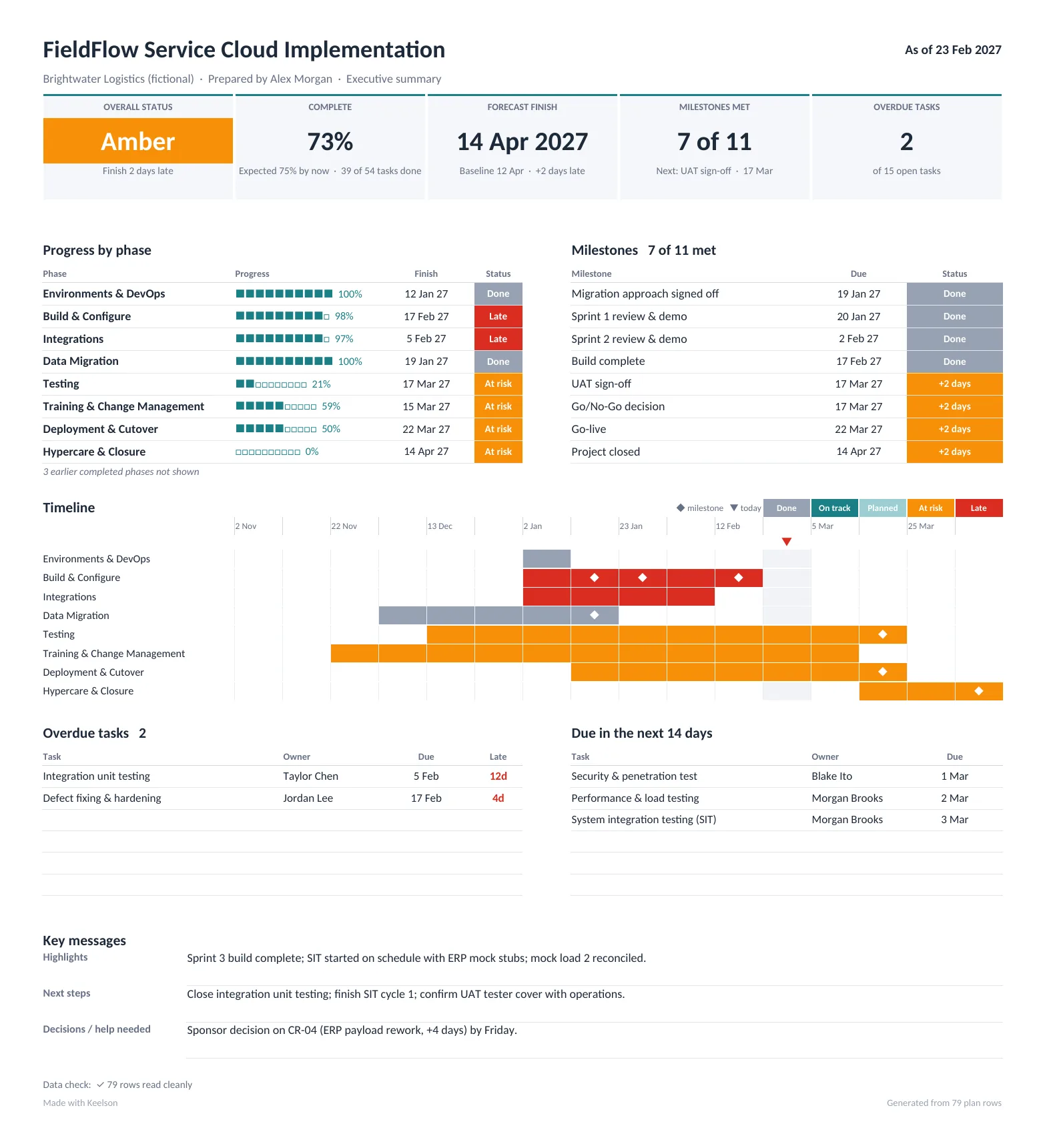
One-page dashboard for the fictional FieldFlow project: overall status Amber, 73% complete, forecast finish 14 April 2027, 7 of 11 milestones met, 2 overdue tasks, progress by phase, milestones, a timeline, overdue tasks and tasks due in the next 14 days.

The real file, filled in from the pasted plan. Tap to open full size. Sample project is fictional.7

Finds your columns.

Finish, End Date, Due Date, Resource Names, Assignee, Epic Link… over 100 header names from the tools PMs actually use. Anything it misses, you pick once from a dropdown.

Reads messy dates.

Mon 3/17/27, 17/03/2027, 17-Mar-27 or real Excel dates. It works out day-or-month-first from your own data.

Shows its working.

Green, Amber or Red from rules you can change, or your own call with a reason. A data check flags missing dates before your sponsor does.

Things you'll stop doing
on Monday.

One plan. Every format.

Hand it over the way
they asked for it.

XYour planKeelson-Project-Plan.xlsx
IDWBSTaskStartFinish%
548Testing14-Dec-2617-Mar-2720%
558.1Test strategy & UAT scripts14-Dec-2618-Dec-26100%
568.2System integration testing18-Feb-2703-Mar-2730%
598.5User acceptance testing04-Mar-2717-Mar-270%
618.7UAT sign-off17-Mar-2717-Mar-270%
CClient's templateBrightwater PMO standard (fictional)
RefActivityResponsibleEnd DateRAG StatusProject
8Testing17/03/2027In ProgressFF-2026
8.1Test strategy & UAT scriptsMorgan Brooks18/12/2026CompleteFF-2026
8.2System integration testingMorgan Brooks03/03/2027In ProgressFF-2026
8.5User acceptance testingAvery Singh17/03/2027Not StartedFF-2026
8.7UAT sign-offAvery Singh17/03/2027Not StartedFF-2026
PMS ProjectKeelson-Project-Plan-MSProject.xml
IDTask NameDurationPredecessors
54Testing62 days
55Test strategy & UAT scripts5 days21
56System integration testing (SIT)10 days42,47,55
57Performance & load testing4 days56SS+5 days
59User acceptance testing (UAT)10 days56,52
SGoogle SheetsUploaded .xlsx, formulas live
ABCDE
58548Testing14-Dec-2617-Mar-27
59558.1Test strategy & UAT scripts14-Dec-2618-Dec-26
60568.2System integration testing18-Feb-2703-Mar-27
63598.5User acceptance testing04-Mar-2717-Mar-27
65618.7UAT sign-off17-Mar-2717-Mar-27
Project Dashboard
Amber
14 Apr
+2 days
72%
0.95
2
The source

One plan you actually maintain.

Dates, roll-ups and status all calculate from the tasks you type. This is the only place you update.

Client's own Excel

Their columns, their order, their dates.

Describe the client's template once. Every week, copy the Client Format tab into their file.4

MS Project

Ready for Project, links intact.

Hierarchy, durations, baselines and dependencies, renumbered for Project's own task IDs.2

Google Sheets

Upload it. It still calculates.

No macros means nothing to convert. The plan keeps scheduling in the browser.1

PDF and CSV

Print it, or pipe it anywhere.

Print-ready layouts for the steering committee, and CSV for Jira, Power BI or your own database.

It schedules itself

Drag one duration.
Watch go‑live move.

Successors, phases, the Gantt and the dashboard recalculate around weekends and your holidays.

Every position below comes from the Keelson scheduler run on the sample plan. Presidents' Day (15 Feb) is in its holiday list, which is why some days of slip cost more than others.

6 days
Go‑live Thu 18 MarOn baseline

A status you can defend

The colour shows
its working.

Slip, overdue milestones, overdue tasks and schedule performance decide it, against tolerances you set once. Override it if you must; your reason prints right beside it.

Calculated by rulesStatus date 23 Feb 2027
!Forecast finish no later than baseline+2 days
✓No overdue milestones0
✓No more than 2 overdue tasks2
✓Schedule performance at least 0.9550.95

PM override: none. Change the colour and readers see both values, and why.

Go-live, under control

The cutover weekend,
minute by minute.

Enter actual times as steps finish. Every later step re-forecasts, the Go/No-Go answers from your criteria, and hypercare tracks SLAs from the first ticket.

8Load work orders and 24 months of history+35 min
9Reconcile counts and totalsDone
14Smoke test a work orderRunning
15Business verificationNext
101Rollback: restore legacy databaseIf needed
Go / No-GoGO WITH CONDITIONS
Forecast vs plan+70 min
Hypercare SLA met78%

Fluent in your method

PMBOK, PRINCE2, agile and ITIL.
Already in the right places.

If you trained for the PMP, PRINCE2, PMI-ACP, ITIL or CISM, you'll recognise every artefact and know where to find it.

You know it asIn KeelsonWhere
PMBOK® Guide · PMP®
Schedule baselineBaseline start and finish per task, variance in working daysPlan
Risk registerProbability × impact, owner, response, dated actionRAID › Risks
Issue, assumption and decision logsA register each, with owners and overdue flagsRAID
Integrated change controlSchedule and cost impact, approval, baseline-updated checkRAID › Changes
Schedule performance (SPI)Duration-weighted earned ÷ planned progress at the status date5Dashboard
PRINCE2®
TolerancesRAG thresholds set once; breach one and the colour changesSettings
Highlight reportDashboard with the three-line status narrativeDashboard
PMI-ACP® · Scrum · hybrid delivery
Sprints in a stage-gated planSprint planning, build and review milestones inside BuildPlan › 5.1–5.3
ITIL® 4
Change enablement, release & deploymentApproved changes, timed cutover, rollback windowRunbook
Incident management, service transitionP1–P4 SLAs, breach flags, handover to BAU supportHypercare · Plan 11.2
CISM® · ISO/IEC 27001
Risk assessment and treatmentLikelihood × impact heat map; avoid, mitigate, transfer, acceptRAID › Summary
Security workstreamSecurity requirements, access model, pen test as a Go/No-Go criterionPlan · Go-No-Go

Keelson is independent and not endorsed or certified by any of these bodies.6

The details.

Workbooks

Project Plan & Gantt · RAID & Change Log · Go-Live RunbookEach one twice: blank for your project, and filled with a worked example.

Plan

500 tasks, up to 3 predecessors each, 52-week Gantt.Finish-to-start and start-to-start with leads and lags in working days. FF and SF links are flagged and treated as finish-to-start.Monday to Friday plus your own holiday list.

Status

Rule-based RAG against tolerances: finish slip, overdue milestones, overdue tasks, SPI.5PM override with a visible reason. A Data Check column explains every bad input in plain words.

Registers

Risks with heat map and top five, issues, assumptions, dependencies, decisions, change requests with schedule and cost impact.

Go-live

Timed runbook with forecast times, rollback window, Go/No-Go from your criteria, P1–P4 hypercare SLAs and a daily ticket trend.

Hand-over

Client's own template: up to 20 columns, any order, fixed values, five date styles, weekly-grid view.4MS Project XML (beta)2, CSV for every register, printable PDF.

Requirements

Excel for Microsoft 365 or Excel 2021 and later, on Windows or Mac. Or Google Sheets.1No macros, add-ins or passwords.

Licence

Unlimited own and client projects. One licence per person. Share filled-in files freely; don't resell the templates.

Which Keelson
is right for you?

Free sample

$0Try it on a real plan

Download
  • Project Plan & GanttSoftware implementation, blank and filled in
  • Client-format mapperYour client's own template
  • RAID & Change LogNot included
  • Go-Live RunbookNot included
  • Dashboard for any planPaste a plan, get a one-pager

One pack

$9One project type, one time

Buy Software pack
  • Project Plan & GanttBlank and filled in
  • Client-format mapperYour client's own template
  • RAID & Change LogRisks, issues, decisions, changes
  • Go-Live RunbookCutover, Go/No-Go, hypercare
  • Dashboard for any planPlus MS Project XML, CSV, PDF
Best value

All five packs

$29Software now, four more as released

Buy all five
  • Everything in One packFor every project type
  • ERP / CRM, IAM, Cloud, GeneralDelivered free as each is finished
  • Client-format mapperIn every pack
  • Unlimited client projectsOne licence per person
  • Dashboard for any planFree v1.x updates

Prices in USD. Secure checkout and instant download by Lemon Squeezy, which also handles sales tax and VAT.

Questions, answered.

Will the dashboard read my plan?

If it has one row per task with a name and a finish or due date, yes. It recognises the usual column names from MS Project, Smartsheet, Jira, Asana, Monday and most client trackers, and title rows above the headers are fine. Phases come from a Phase or Workstream column, or from your outline levels or WBS. Everything happens inside the Excel file: nothing is uploaded.

Can it really match my client's Excel template?

For templates with one row per task, yes: up to 20 columns in any order, fixed values, blank columns and five date styles. Merged cells or several rows per task still need a tidy-up after pasting.

Is it PMBOK or PRINCE2 compliant?

It uses their vocabulary and the artefacts both expect: baselines, tolerances, registers and change control. No standards body certifies templates, and Keelson doesn't claim to be certified or endorsed.

Can I use it on client projects?

Yes, on any number of your own and your clients' projects. Share the filled-in files with anyone; don't resell or give away the templates themselves.

Do I need to enable macros?

No. Every workbook is a plain .xlsx with formulas only, so company security settings won't block it.

Will I get a native .mpp file?

No. You get MS Project XML, which MS Project desktop opens directly, plus an import tab. Microsoft Planner can't import either.

When do the other packs arrive?

As each one is finished. If you bought all five, each new pack lands on your order page and in your inbox at no extra cost.

Your next plan is
already half built.

  1. Every value in every workbook is recalculated on each build and compared with an independent reference calculation, including invalid input and a full 500-task plan. Excel 2019 and earlier are not supported. In Google Sheets, charts and some formatting may look different.
  2. MS Project and Smartsheet import are in beta. The XML is generated and read back with an independent MS Project file reader on each build; check dates after importing. Native .mpp files are not produced.
  3. Sample company, people and project are fictional. Every date and figure on this page comes from the sample workbooks.
  4. Templates with one row per task, up to 20 columns. Merged cells, several rows per task or grouping by person need a manual step after pasting.
  5. Keelson's SPI weights progress by task duration because templates rarely hold cost data. It is a schedule measure in the spirit of earned schedule, not the cost-based EV ÷ PV of earned value management.
  6. PMI, PMP, PMBOK and PMI-ACP are registered marks of the Project Management Institute, Inc. PRINCE2 and ITIL are registered trademarks of AXELOS Limited, part of PeopleCert. CISM is a registered trademark of ISACA. ISO/IEC 27001 is a standard of ISO and IEC. Keelson is not affiliated with, endorsed or certified by any of them.
  7. The dashboard is checked on each build by pasting the same plan in five shapes (MS Project export, MS Project text paste, Jira CSV, a client tracker with title rows and day-first dates, and Keelson's own plan) and comparing every figure with an independent reference calculation. Up to 1,000 rows. Working days are Monday to Friday.